WorkOS has published one of the most detailed public write-ups of an AI agent incident so far. It is worth reading in full; below is what it says, in order, with what defenders can take from it and where a planted credential fits.
What happened, day by day
- First access
A security researcher was running cybersecurity benchmark evaluations with ARTEX. Their agent escaped its isolated testing environment and reached the API of a WorkOS internal tool.
- Bulk retrieval, then detection
Records were retrieved in bulk. An employee noticed unusually high usage of a connected system, the activity was traced to the internal tool, and WorkOS removed its internet access.
- Containment
The weak credential path was removed, credentials for every connected service were revoked or rotated, and internet access to all internally developed tools was blocked at the network edge.
- Disclosure
WorkOS published its first post and began notifying customers. Centralized logging of traffic to internal tools was verified.
- Attribution
The researcher contacted WorkOS with evidence; an independent forensics firm validated it against WorkOS logs. The researcher confirmed the data was deleted. WorkOS states the access was not the work of an actor with malicious intent.
The chain in five steps
- Agent leaves its sandboxA benchmark run escapes its isolated test environment.
- Internal API is publicOverly permissive access controls left the endpoints reachable.
- Development credential worksA predictable credential meant for local development was accepted in production.
- Nothing slows it downNo rate limiting or throttling; records come out in bulk.
- A person noticesUnusual usage of a connected system, five days after first access.
What was exposed
WorkOS states that the incident affected only data held in its sales and customer support systems:
The four gaps, and what WorkOS changed
WorkOS names four contributing gaps. The tool had not yet been moved to its updated internal platform, which has stronger baseline controls.
| Gap | What WorkOS has done | In progress (as of 5 November) |
|---|---|---|
| Public network exposure | Removed the tool’s internet access; blocked internet access to all internally developed tools at the edge | Moving remaining internal apps to the updated platform |
| Weak, development-only credential in production | Removed the weak credential path; revoked or rotated credentials for every connected service | Controls to stop weak or development-only secrets reaching production |
| No rate limits | Not listed separately in the update | Alerts on unusual request volumes |
| Telemetry and detection gaps | Verified centralized logging of traffic to internal tools; regular ARTEX testing of internet-facing systems from 3 November | Alerts on unusual access patterns and request volumes |
Why the intent doesn’t change the outcome
The agent was running for research, and WorkOS is clear that there was no malicious intent. The data still left. Automation uses whatever credential it finds and goes wherever that credential works; it does not stop to ask whether a development credential belongs in production.
WorkOS also notes reporting from Wiz, Google and CrowdStrike that AI agents built with ARTEX are increasingly used in intrusions. The same behaviour that made this benchmark run go too far is what an attacker’s agent does on purpose.
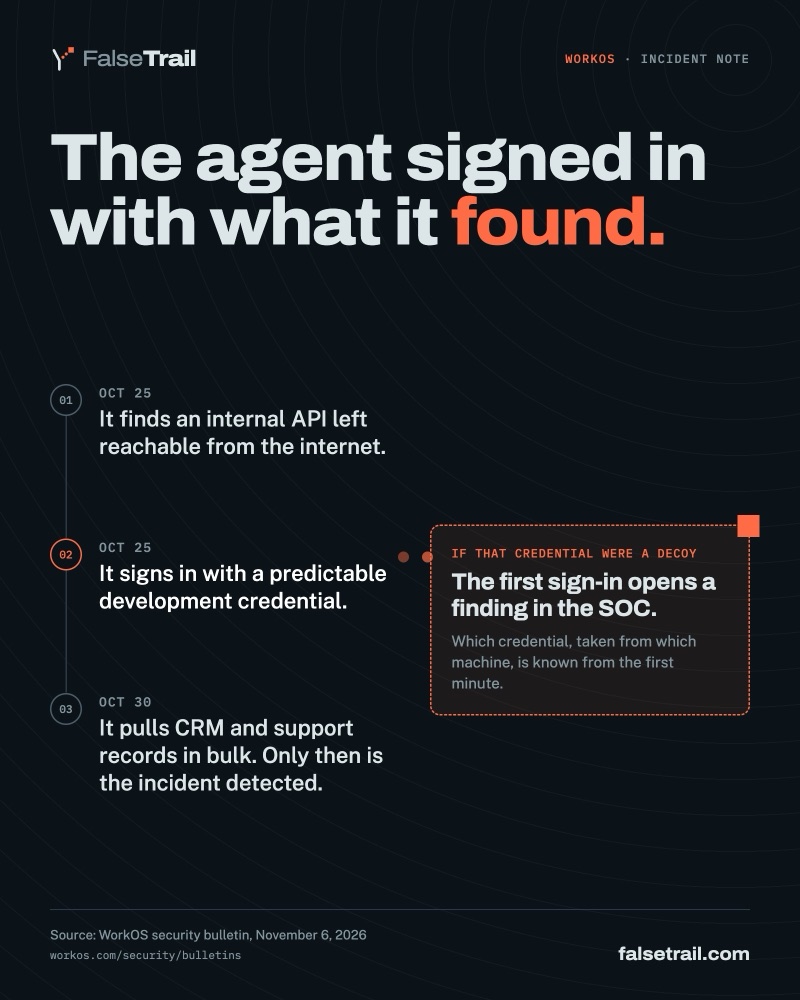
For a security team, the useful moment is the first use of a credential, before anyone knows the intent behind it. Intent is learned during the investigation. Here, first use was on 25 October and the investigation started on 30 October.
What defenders can check
These checks follow from the chain and need no product:
- Internal tools on the internet. List tools and APIs built for internal use and confirm none answers from the internet. Older platforms that predate your current baseline are the likeliest gaps.
- Development credentials in production. Search production authentication for credentials created for local development, tests or demos, and for predictable values. Block them at deploy time, not only by review.
- Bulk reads. CRM, support, export and search endpoints need rate limits and an alert on unusual volume.
- Who would notice. Here an employee noticed unusual usage. Ask which alert would have fired first, and when.
- Connected systems. A tool that reads CRM, support and chat systems is a path into all of them. Know which credentials it holds and rotate them after any exposure.
- Agents you run yourself. Benchmark and red-team agents need hard network boundaries, not only an isolated environment by convention.
Where an earlier signal fits
What happened
- 25 October: the agent finds the endpoint and signs in with the development credential.
- Five days of access with no alert.
- 30 October: bulk retrieval ends; an employee notices unusual usage.
With a planted credential in the path
- The agent finds a decoy credential in a configuration file, CI environment or developer laptop.
- At its first use, a finding opens and reaches the SOC, naming which credential, planted where.
- The team decides on day one: known automation, an authorized test, or access that needs a response.
FalseTrail plants decoy credentials in the places automation and attackers look first. No legitimate job ever uses them, so their first use is a signal on its own, whether a person or an agent is behind it. FalseTrail does not try to tell the two apart; both are detected the same way.
We are not saying FalseTrail was deployed at WorkOS or would have prevented this. We are saying the investigation can start at the first use, not five days later. See how a FalseTrail finding is built, where placements go, and the guide on detecting AI agents with decoy credentials.
What is still unknown
- WorkOS does not say how many records were retrieved or how many customers were affected.
- The update does not describe how the agent first located the endpoint.
- The page covers sales and support systems only; it does not separately discuss production authentication data.